
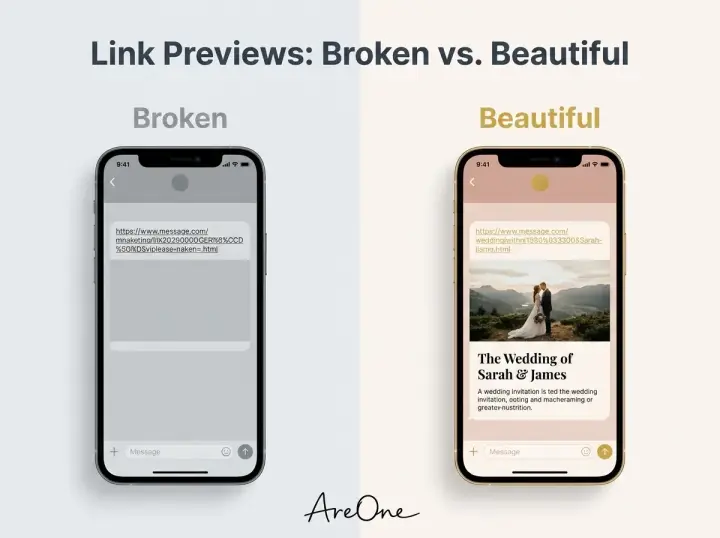
TL;DR: Perfecting your wedding invitation link preview ensures that when you send your digital invite via WhatsApp or iMessage, guests see a beautiful, clickable image rather than a dull, text-only URL.
The First Digital Impression of Your Big Day
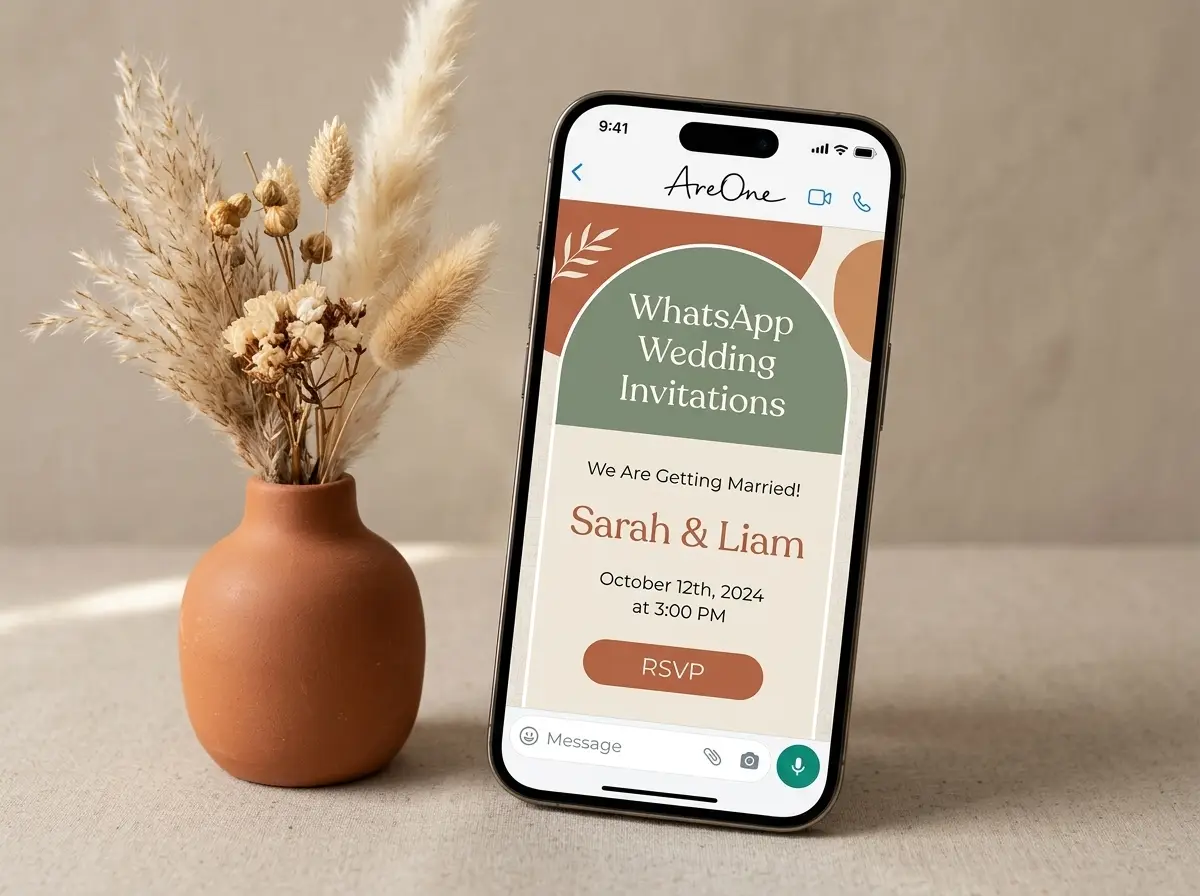
When you text a link to your best friend, a coworker, or your grandmother, the messaging app instantly generates a visual snippet. This snippet is your wedding invitation link preview, and it serves as the digital envelope for your celebration. If it looks broken, cropped, or confusing, the magic of the moment is instantly lost. A polished, beautiful link preview builds excitement and reassures your guests that your wedding is going to be an elegant, well-thought-out affair.
Many couples spend weeks choosing the perfect colors, fonts, and photos for their digital invites, only to overlook how that link appears when sent directly to a smartphone. Messaging apps rely on hidden code to pull the right image and text. When you take the time to set this up correctly, your message transforms from a sterile blue hyperlink into a gorgeous, romantic announcement.
Sending digital invitations via messaging apps is one of the most efficient ways to reach your guest list. It removes the friction of postal delays and lost mail. However, because you are competing with everyday texts, memes, and news updates on their screens, your wedding invitation link preview must instantly capture their attention. We want to ensure your digital delivery is just as stunning as a physical letterpress invitation.
Wedding Invitation Link Preview Basics (Open Graph) for Messaging Apps
To understand why some links look amazing while others fall flat, we need to talk about Open Graph. Created by social media platforms, Open Graph tags are snippets of code that dictate how a URL is displayed when shared. When you drop a link into WhatsApp or iMessage, the app crawls these tags to generate the visual preview. If these tags are missing, the app guesses what to display, which usually results in a messy, unprofessional appearance.
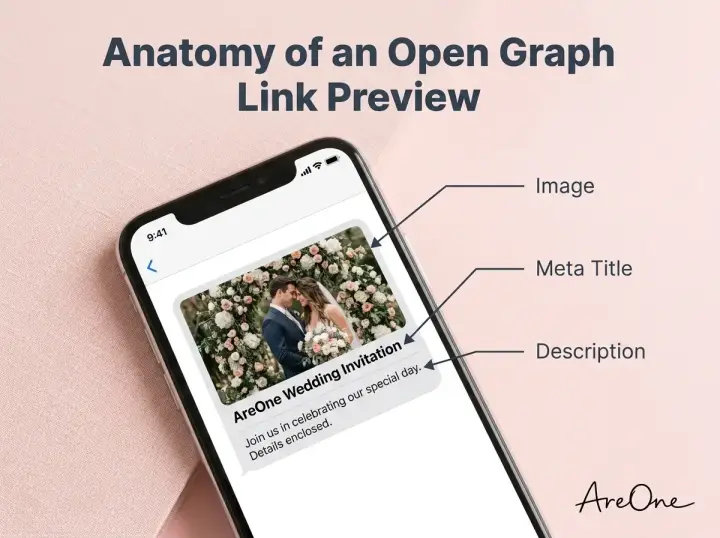
A proper Open Graph wedding invitation includes three main elements: the title, the description, and the image. The title is usually a brief, exciting announcement like 'You are invited to the wedding of Sarah & James'. The description offers a touch more context, such as the date and location. Most importantly, the image acts as the visual hook. Without a specifically designated image, messaging apps might randomly pull a decorative icon or a background pattern from your website.
At AreOne, our platform automatically generates these Open Graph tags for you, taking the technical heavy lifting off your plate. We ensure that your wedding invitation link preview always pulls your chosen cover photo and customized text. You do not need to be a web developer to achieve a flawless result; you simply need a digital invitation platform that understands the importance of modern communication protocols.
The Anatomy of an Open Graph Wedding Invitation
Let us break down the ideal structure of your Open Graph tags so you understand exactly what your guests are seeing. First, the image dimensions are critical. The standard size for an Open Graph image is 1200 pixels wide by 630 pixels tall. This landscape format ensures the image is not awkwardly cropped by WhatsApp or stretched on Facebook Messenger. Keeping vital information near the center of the image guarantees nothing important is cut off on smaller smartphone screens.
Next is the meta title. Keep it punchy and clear. Remember, this text appears in bold right below or next to the image. A title like 'Celebrate with Us!' paired with your names is effective. You want to evoke emotion while being instantly recognizable. Avoid overly long sentences, as most apps truncate the title after about 50 characters, replacing your beautiful words with an unappealing ellipsis.
Finally, the description tag provides a space for vital logistical hints. While guests will click the link to see the full details, providing a subtle hint like 'Join us in Tuscany on September 14th' adds an aura of anticipation. For couples utilizing multilingual digital invitations, ensuring this description matches the primary language of the recipient is a thoughtful touch that enhances accessibility and warmth.
When QR Codes Help (and When They Don’t)
As you plan your digital strategy, you will likely consider pairing your web links with physical elements. This is where QR codes shine. QR codes bridge the physical and digital realms, allowing a guest holding a paper save-the-date or a welcome sign to instantly access your digital portal. They are helpful for directing guests to complex URLs without forcing them to type a long string of characters into their mobile browsers.
However, QR codes are not always the answer. If you are communicating exclusively through digital channels—like email, WhatsApp, or Instagram direct messages—adding a QR code image into a message is actually counterproductive. A guest reading your message on their smartphone cannot easily scan a QR code that is displayed on that exact same screen. In purely digital communications, relying on a robust wedding invitation link preview is vastly superior to sending a barcode graphic.
When used correctly, a QR code adds an interactive layer to physical objects. You can print them on your paper invitations, display them on acrylic signs at the reception, or include them on hotel welcome bags. The goal is to reduce friction. If holding up a smartphone camera is easier than typing a URL, the QR code is the right choice. If clicking a beautiful link is easier, stick to the digital link preview.
What the QR Should Link To (RSVP vs Full Invite)
Once you decide to use a QR code, the next crucial decision is determining its destination. Should the code send guests to the very beginning of your digital invite, or should it bypass the introduction and take them directly to the RSVP form? The answer depends on where and when the QR code is being presented to your guests.
If the QR code is printed on a physical save-the-date or the main paper invitation, it should direct guests to the full digital experience. They need to see the schedule, the travel recommendations, and the story of your relationship. In this scenario, the digital platform acts as the central hub of information. The journey matters just as much as the destination.
Conversely, if you are sending a follow-up reminder card, or if you have a separate insert card dedicated solely to gathering headcounts, you should utilize a direct QR code RSVP link. Sending guests straight to the response form removes unnecessary steps and drastically increases the speed and volume of replies. By streamlining the user journey, you save your guests time and save yourself the headache of chasing down late responses.
Recommended ReadingQR Code RSVP: The Ultimate Guide to Sizing, Links, and Placement →Placement + Sizing (Printouts, Signs, Emails)
Browse invitation layouts that fit your plan.
Compare layouts for schedules, travel details, guest guidance, and RSVP information before choosing one for your invitation.



The physical placement of your QR code directly dictates its usability. A code tucked away in the fold of an envelope might be missed entirely, while one plastered aggressively across the front of a delicate invitation might ruin the aesthetic. Finding the sweet spot between visibility and design harmony is essential for modern couples navigating the hybrid invitation space.
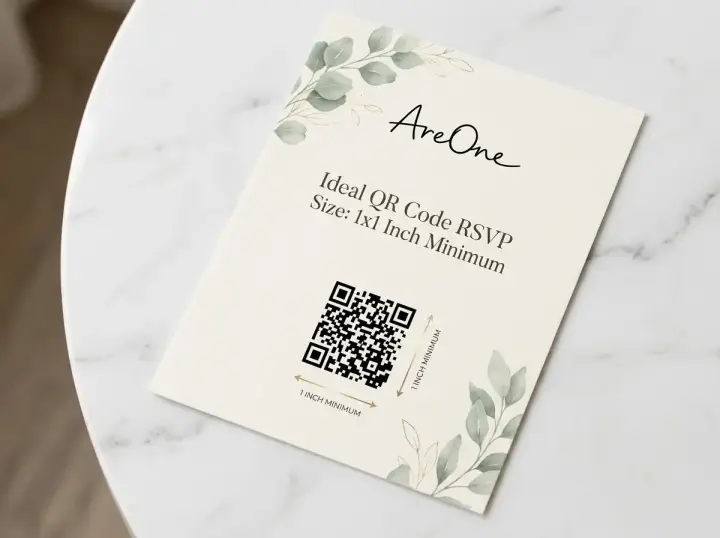
Sizing is perhaps the most critical technical factor. The ideal wedding invite QR code size depends on the scanning distance. For a handheld paper invitation, the minimum recommended size is 1 inch by 1 inch (2.5 cm by 2.5 cm). Anything smaller requires the guest to hold their phone uncomfortably close and rely on perfect lighting to register the code. We want to guarantee a seamless, frustration-free experience for guests of all technical skill levels.
If you are placing a QR code on a large welcome sign or a seating chart easel, the size must scale proportionally. A guest should be able to scan a welcome sign from three to four feet away without blocking the entrance for others. In these cases, a QR code size of 3 to 4 inches is appropriate. Always test your print sizes by taping a sample to the wall and walking backward with your phone.
Quick Reference: QR Code Sizing & Placement
| Application Type | Scanning Distance | Recommended Minimum Size | Best Practice Notes |
|---|---|---|---|
| Paper Invitations & RSVP Cards | 6 to 12 inches | 1 x 1 inch (2.5 cm) | Keep a clear margin (quiet zone) around the code. |
| Table Tents & Menus | 1 to 2 feet | 1.5 x 1.5 inches (3.8 cm) | Ensure high contrast between the code and background. |
| Welcome Signs & Seating Charts | 3 to 5 feet | 3 x 3 inches (7.6 cm) | Place at eye level; avoid reflective acrylic materials. |
| Emails & Digital Messages | N/A (Screen viewing) | Do Not Use | Rely on a clickable link preview instead. |
4 Common Mistakes Couples Make with Digital Sends
Even with the best intentions, digital invitations can suffer from technical missteps. Avoiding these common errors will elevate your digital stationery from amateur to premium, ensuring every guest enjoys a flawless experience from the moment their phone chimes.
1. Ignoring Open Graph Image Dimensions
Many couples upload a beautiful, vertical portrait as their cover photo. Unfortunately, messaging apps crop vertical images into wide rectangles. This often results in a wedding invitation link preview that cuts off the couple's heads or displays only a random section of the background. Always use a landscape image (1200x630 pixels) specifically for your link preview metadata.
2. Making the QR Code Too Small
In an effort to keep paper invitations looking minimalist and clean, couples often shrink the QR code to the size of a postage stamp. As mentioned earlier, this severely impacts scannability. If an older guest with an older smartphone struggles to scan the code, they will likely give up, forcing you to manually collect their RSVP via a phone call.
3. Using Heavy, Unoptimized Images
If your link preview image is a massive 10MB raw file from your photographer, messaging apps will refuse to load it. Apps like WhatsApp have strict file size limits (usually under 300KB) for generating instant previews. If the image is too heavy, the app times out and displays a blank gray box. Always compress your images before finalizing your settings.
4. Forgetting About Desktop Users
While most guests will view your link on a smartphone, a portion will open it on their work laptops or desktop computers. Ensure your digital platform is responsive. A layout that looks gorgeous on an iPhone must gracefully adapt to a wide desktop monitor without stretching images or breaking text alignment.
Need a faster RSVP flow?
Use AreOne to collect guest replies, meal choices, and reminders in one clean workflow.
Copy-Paste Wording Examples for WhatsApp & iMessage
Sending a digital link requires different etiquette than mailing a formal envelope. You need wording that feels personal, warm, and clear about what the recipient needs to do next. A naked link sent without context can trigger spam filters or simply look impolite. Here are detailed, copy-paste templates you can use alongside your beautiful link preview.
Example 1: The Casual & Direct Approach
Use this for close friends and peers who expect modern, relaxed communication. It gets straight to the point while maintaining an enthusiastic tone.
'Hi [Name]! We are so thrilled to officially invite you to our wedding this [Month]. All the details, travel info, and RSVP forms are in the link below. We cannot wait to celebrate with you! Please let us know if you can make it by [Date].'
Example 2: The Formal & Traditional Tone
Perfect for older relatives or colleagues. It brings the grace of traditional paper stationery into the digital messaging space.
'Dear [Name], together with our families, we joyfully invite you to witness our marriage. We have created a digital invitation with all the necessary details for our upcoming celebration. Please tap the beautiful link preview below to view our website and submit your kind response.'
Example 3: The Gentle RSVP Reminder
Chasing down RSVPs is inevitable. This template is polite, simpler, and gently pushes them toward the finish line without inducing guilt.
'Hello [Name]! We are finalizing our numbers with the caterer this week and wanted to check in. We would love to have you there! Could you please click the link below and let us know your plans by Friday? Thank you so much!'
Providing context around the link ensures guests feel valued. When they read your warm message and immediately see a stunning, customized link preview underneath it, the entire experience feels intentional and premium.
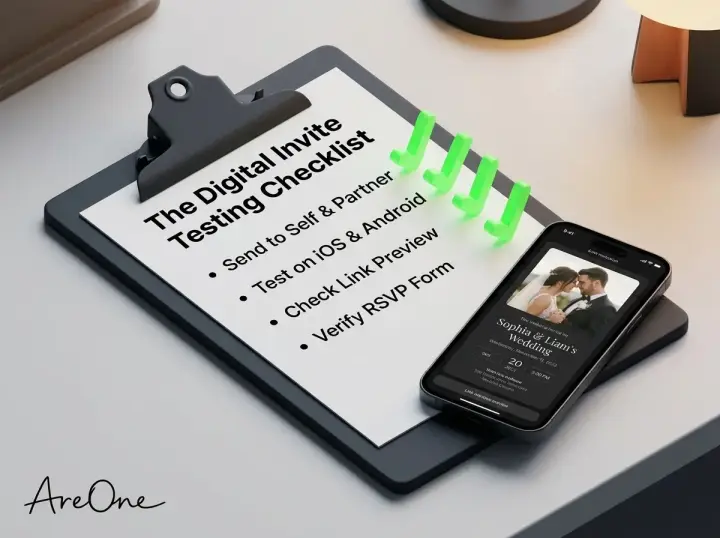
The Ultimate Testing Checklist (Mobile Cameras, Dark Mode, Accessibility)
Before you broadcast your invitation to your entire guest list, rigorous testing is mandatory. Tech setups vary wildly among your guests. Some use older Android devices, some have dark mode permanently enabled, and others require larger text settings. Use this comprehensive checklist to guarantee perfection.
- Send a Test to WhatsApp: Paste your link into a chat with your partner. Wait three seconds before hitting send to ensure the app fetches the image. Verify the crop and title look perfect.
- Send a Test to iMessage: Apple devices handle links slightly differently. Send it via iMessage to verify the image loads natively without requiring the user to tap 'Tap to load preview'.
- Check Dark Mode Compatibility: Switch your phone to dark mode and view the link preview. Ensure your text remains legible and your images do not clash with the dark background.
- Scan the QR Code with an iPhone: Open the standard iOS camera app and point it at a printed test page. It should instantly recognize the URL without needing a third-party app.
- Scan the QR Code with an Android: Repeat the process using Google Lens or a standard Android camera to ensure cross-platform reliability.
- Validate Open Graph Tags: For the highly technical, use a free online debugger tool (or read up via authoritative sources like Google Search Central) to confirm your meta tags are firing correctly.
- Test the RSVP Flow: Click your own link, pretend to be a guest, and fill out the RSVP form. Verify the confirmation screen appears and that the data securely reaches your dashboard.
By meticulously verifying each of these steps, you protect your guests from technical glitches and protect yourself from a flood of confused text messages. A seamless test run is the foundation of a simpler digital sending experience.
Tying the Knot with Flawless Tech
Your digital invitation is the magnificent prologue to your wedding day story. By mastering the nuances of Open Graph tags and understanding exactly how messaging platforms process data, you ensure that every digital interaction feels premium. A well-executed digital send removes anxiety, increases response rates, and sets a joyful tone for the upcoming celebration.
Before you hit send and give your loved ones a breathtaking wedding invitation link preview of your beautiful future together, ensure your platform is doing the heavy lifting for you. You deserve to focus on the romance, not the code.
Frequently Asked Questions
Find quick answers to common questions about this article.

No approved comments yet.