
TL;DR: An effective RSVP confirmation message reassures guests that their response was received, clarifies important wedding details, and saves couples hours of stressful follow-up texts.
The Magic of a Perfect RSVP Confirmation Message
Getting married is one of the most exciting milestones you will ever experience. However, tracking down guest responses and managing the guest list can quickly become a stressful chore. This is exactly where a well-crafted RSVP confirmation message comes to your rescue. It acts as an instant digital handshake, reassuring your friends and family that their submission went through successfully. When a guest fills out your form, they need immediate reassurance. Without it, you will undoubtedly receive dozens of texts asking, 'Did you get my RSVP?'
Your RSVP confirmation message must appear within the first few seconds of a guest clicking submit. It provides immediate peace of mind for both the builders (you, the couple) and the readers (your guests, including elderly relatives who might be wary of technology). By using a reliable digital platform, you automate this entire process. Not only does this save you countless hours, but it also creates a premium, organized experience for everyone attending your big day.
[Insert Image Here: Alt text containing RSVP confirmation message displayed elegantly on a modern smartphone screen]
What Guests Need to Know (The 3 Must-Haves)
A successful confirmation screen or email does more than just say thank you. It serves as a crucial hub of information. When guests receive this message, they are engaged and actively thinking about your wedding. You must capitalize on this moment of attention. There are three essential elements you must include to make the communication effective.
First, you need a clear, unmistakable confirmation statement. Phrases like 'We got it!' or 'Your RSVP is officially recorded' leave zero room for confusion. Second, you must outline the immediate next steps. Should they book their hotel room now? Is there a welcome party they need to know about? Give them actionable directions. Finally, you need to provide a clear point of contact. Life happens, and plans change. If a guest suddenly discovers a new allergy or has a schedule conflict, they need to know exactly who to email or call without hunting down your personal number.
Set Your RSVP Deadline (Best Practice Timeline)
One of the most critical aspects of planning is choosing the correct RSVP deadline. If you set it too close to the wedding, you will scramble to finalize seating charts and caterer headcounts. If you set it too early, guests might not know their work schedules yet, leading to inaccurate responses or a higher rate of drop-offs. Striking the perfect balance is a delicate art.
Industry experts, including seasoned planners featured on The Knot, generally recommend setting your final deadline three to four weeks before the actual wedding date. This golden window gives your caterer the final numbers they require while offering you a buffer week to chase down any stragglers. When calculating this date, look at when your vendors need final payment and subtract two weeks. This becomes your absolute cut-off line.
When sharing this date, be firm but polite. Make sure the deadline is visible on your invitations, your wedding website, and within every single reminder you send. Consistency is key to getting prompt replies.
Wording Templates (Online RSVP, QR RSVP, Email RSVP)
Not everyone communicates the same way, and your wedding tone might range from a black-tie gala to a barefoot beach party. Having the right online RSVP wording ensures your brand voice remains consistent from the initial save-the-date all the way to the final confirmation screen. Below, we have provided several copy-paste examples you can use directly on your AreOne dashboard.
Formal Copy-Paste Example:
'Thank you for responding. Your RSVP has been formally received. We are overjoyed that you will be joining us to celebrate our union. Please visit the accommodations tab on our website to secure your lodging before the room block expires. If any changes to your attendance arise, kindly notify us at [Email Address].'
Casual Copy-Paste Example:
'We got it! Thanks for letting us know your plans. We can’t wait to hit the dance floor with you on [Date]. Don’t forget to check out our travel page for hotel discounts, and let us know if you have any questions. See you soon!'
Witty Copy-Paste Example:
'Your response is locked in! Whether you are coming for the romance or just the free cake, we are thrilled to have you. Make sure you stretch those dancing muscles. If you need to change your RSVP later, just drop us a note at [Email].'
These templates work beautifully because they are clear, concise, and immediately answer the unspoken question: 'What do I do next?' Explore our modern digital invitation templates to find a design that perfectly matches your chosen wording.
[Insert Screenshot Here: AreOne dashboard showing online RSVP wording setup and template customization]
Managing Meal Choices and Allergies
Food is one of the most memorable parts of any wedding celebration. It is also one of the most stressful elements to organize. Collecting accurate meal choices and dietary restrictions upfront prevents dangerous allergic reactions and ensures every guest feels cared for. You must be explicitly clear when asking these questions on your digital forms.
Do not leave an open-ended text box for meal choices unless necessary. Instead, use clear drop-down menus or radio buttons. For example, list exactly what the dish is: 'Herb-Roasted Chicken with Asparagus' rather than just 'Chicken'. After the meal selection, always include a mandatory field for allergies. You can use wording like: 'Please list any severe food allergies or dietary restrictions (e.g., Celiac, Nut Allergy, Vegan). If none, please write None.'
| Dietary Need | How to Word It on the RSVP Form | Why It Works |
|---|---|---|
| Vegan/Vegetarian | 'Please select your preference: Standard, Vegetarian, or Vegan.' | Avoids confusion between plant-based and dairy-free diets. |
| Severe Allergies | 'Do you have any severe allergies we should communicate to the chef?' | Shows care and shifts responsibility to the catering team. |
| Gluten-Free | 'Are you strictly gluten-free or Celiac?' | Helps the kitchen differentiate between preferences and medical needs. |
Clear Rules for Plus-Ones and Kids
Addressing plus-ones and children is notoriously tricky. You want to be polite, but budget constraints and venue limits often dictate strict rules. Your online RSVP wording must handle these delicate situations firmly so guests do not write in uninvited companions. Digital RSVPs handle this beautifully by restricting the number of guests a user can RSVP for.
If your wedding is adults-only, state it clearly but kindly. Copy-Paste Example: 'While we adore your little ones, we have chosen to make our special day an adults-only celebration. We hope this advance notice allows you to secure a sitter and enjoy a night off with us!'
For plus-ones, ensure your system is locked so only named guests can reply. If you are allowing a guest to bring a date, use wording like: 'We have reserved 2 seats in your honor. Please provide the name of your guest below for the seating chart.'
Crafting the Perfect RSVP Reminder Wording
Even with the most beautiful invitations, people will forget to reply. It is simply human nature. Life gets busy, emails get buried, and physical mail sits on the kitchen counter. This is why having a structured RSVP reminder wording strategy is essential. You want to prompt your guests without sounding like a demanding bill collector.
Browse invitation layouts that fit your plan.
Compare layouts for schedules, travel details, guest guidance, and RSVP information before choosing one for your invitation.



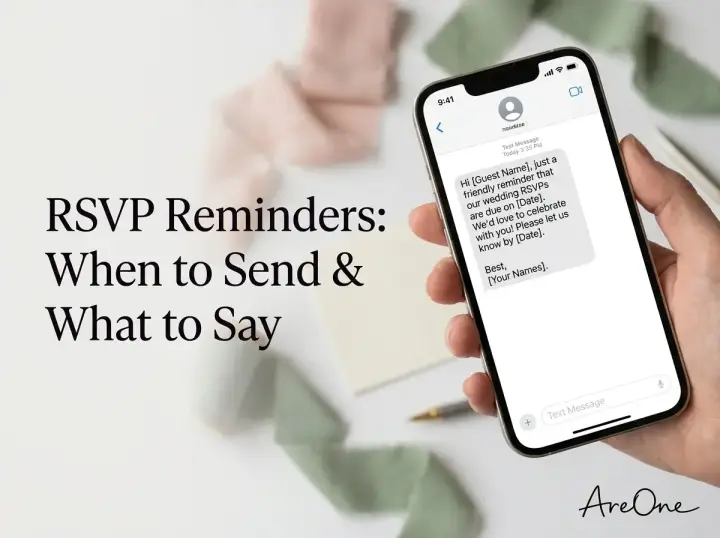
When drafting your reminders, assume positive intent. Assume they want to come but simply forgot to click the final button. Keep the tone light, helpful, and focused on excitement. Remind them that finalizing the numbers helps you plan the best possible party. For a deeper look at timing, read our full guide on when to send RSVP reminders to maximize your response rate.
Reminder Sequence (1st, 2nd, Final Nudge)
A structured reminder sequence takes the emotion out of following up. By planning these messages in advance, you can automate the nudges and focus on other planning tasks. Here is a proven checklist for structuring your follow-ups.
- One Week Before Deadline: The Gentle Nudge. 'Hi everyone! We are so excited for the big day. Just a quick reminder that our RSVP deadline is coming up next week on [Date]. We can’t wait to celebrate with you!'
- Day of the Deadline: The Direct Request. 'Today is the day! We are finalizing our numbers with the caterer this evening. Please take two minutes to submit your RSVP by midnight tonight so we can save you a seat.'
- Post-Deadline: The Final Warning. 'Hi [Name], we are submitting our final headcount tomorrow morning. If we do not hear from you by [Time], we will assume you are unable to attend and will mark you as a regret. We will miss you!'
[Insert Image Here: Couple happily reviewing their digital guest list on a tablet]
Need a faster RSVP flow?
Use AreOne to collect guest replies, meal choices, and reminders in one clean workflow.
Common Mistakes Couples Make With RSVPs
Even the most organized couples can stumble when it comes to gathering responses. Relying strictly on traditional paper methods often leads to lost mail and frustrated guests. However, even with digital tools, there are pitfalls you must actively avoid to maintain a simpler planning environment.
Mistake 1: Skipping the Automated Confirmation
We cannot stress this enough: failing to set up an automated RSVP confirmation message is a massive mistake. When a guest submits their meal choices and travel plans into a void with no receipt, they panic. They will text you, email your mother, and call your bridal party just to ensure it worked. Setting up an auto-responder takes five minutes but saves hours of manual reassurance.
Mistake 2: Poor Timeline Planning
Many couples set their RSVP deadline far too late. If your wedding is on the 30th and your deadline is the 25th, you are setting yourself up for a nightmare. Caterers and rental companies need absolute final numbers well in advance. Always build a buffer of at least seven to ten days between your RSVP deadline and the date your vendors actually require the headcount.
Another timeline error is sending invitations too early. According to etiquette resources like Brides, sending out formal invites six to eight weeks before the wedding is the sweet spot. If you ask for a response six months in advance, guests will forget about it because the event feels too far away.
Mistake 3: Vague Dietary Requests
Asking 'Do you have any dietary needs?' is too vague and often leads to guests writing unhelpful responses like 'I prefer chicken.' You must be specific. Differentiate between a medical allergy and a simple preference. Failure to accurately capture this data can result in cross-contamination issues in the kitchen or expensive last-minute meals having to be prepared by the venue.
Troubleshooting Late or Missing Responses
The deadline has passed, and you still have fifteen people who have not responded. Do not panic. This happens at literally every single wedding. First, utilize your digital RSVP platform to send one final mass email to the non-responders. Platforms like RSVPify or AreOne make filtering these guests simple.
If emails fail, it is time to pick up the phone. Divide the list among yourself, your partner, and your parents. Call the missing guests with a script: 'Hi Aunt Jane! We are finalizing our catering numbers today and need to know if you can make it. If I don't hear back by 5 PM, I unfortunately have to mark you as a no.' Be firm. Do not leave the conversation open-ended. You are paying for every single plate, and you deserve a definitive answer.
To discover more ways to streamline your entire planning experience, read our comprehensive online wedding RSVP guide.
The Final Say on Confirmations
Sending the perfect RSVP confirmation message shouldn't feel like a heavy re-spondsibility. By leveraging smart digital tools, clear wording, and strategic reminders, you can completely eliminate the chaos of tracking down your guests. Let technology handle the tedious data entry and awkward follow-ups. When you automate the heavy lifting, you gain the freedom to actually enjoy the final weeks leading up to your celebration. Get your systems in place, stick to your deadlines, and watch your guest list organize itself effortlessly.
Frequently Asked Questions
Find quick answers to common questions about this article.

No approved comments yet.